> ## Documentation Index
> Fetch the complete documentation index at: https://docs.radicalwhale.com/llms.txt
> Use this file to discover all available pages before exploring further.
# Datasets
> Intelligent data tables with AI-driven research and analysis
## What are Datasets?
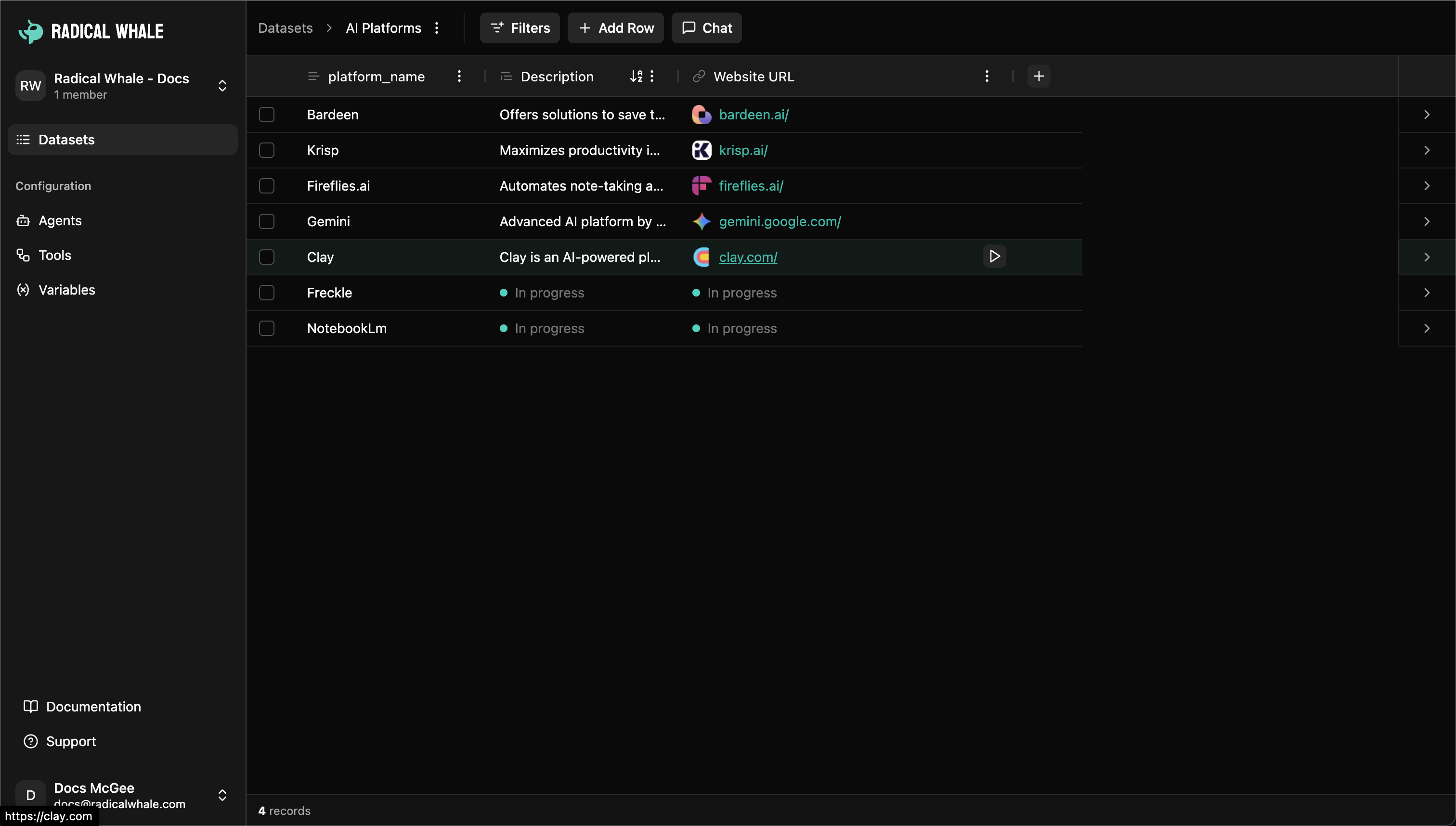
Datasets are intelligent data tables where each row becomes a rich record and every cell can be enhanced by AI. Unlike traditional spreadsheets, datasets combine structured data storage with powerful AI-driven research and analysis capabilities.
 ## Core Components
**Datasets**: Flexible schema with metadata, real-time processing, team collaboration, and CSV export capabilities.
**Records**: Each row with expandable views, rich pages for documentation, processing history, and cross-references.
**Columns**: Data types (short text, long text, numbers, dates, URLs, checkboxes, selects), AI instructions, agent assignment, validation rules, batch operations.
**Cells**: Structured values with metadata, AI evidence showing reasoning and sources, processing status, manual override, source tracking.
## Data Types
* **Text**: Short text (names, titles), long text (descriptions), URLs (with validation)
* **Structured**: Numbers (integers/decimals), dates (intelligent parsing), checkboxes (true/false)
* **Selection**: Select (single choice), multiselect (multiple choices)
## Creating and Managing
**Dataset creation**: Name, description, import CSV or build from scratch, configure columns.
**Data import**: CSV upload with automatic header detection, data type inference, flexible encoding, large file handling.
**Column management**: Choose data types, assign AI agents, set validation rules, create dropdown options, define dependencies.
## AI-Powered Processing
**Individual cell research**: Click research button to queue for AI processing, agents analyze context from other columns, results include value plus evidence and sources.
**Batch operations**: Run All (process every cell), Run Missing (process empty cells only), queue selected rows, background processing.
**Processing states**: Empty, queued, processing, completed, error (with detailed information).
**Evidence**: Reasoning explaining AI's approach, source links with previews, confidence indicators, manual override capability.
## Features
**Record details**: Field overview, evidence browser, search and filter, related data connections.
**Pages**: Markdown editor for record documentation, multiple pages per record, version history, team collaboration.
**Filtering**: Column-based filters, text search, status filters (processed/pending/error), creator filters.
**Management**: Favorites, bulk operations, export to CSV, sorting with persistent preferences.
## Chat-Driven Operations
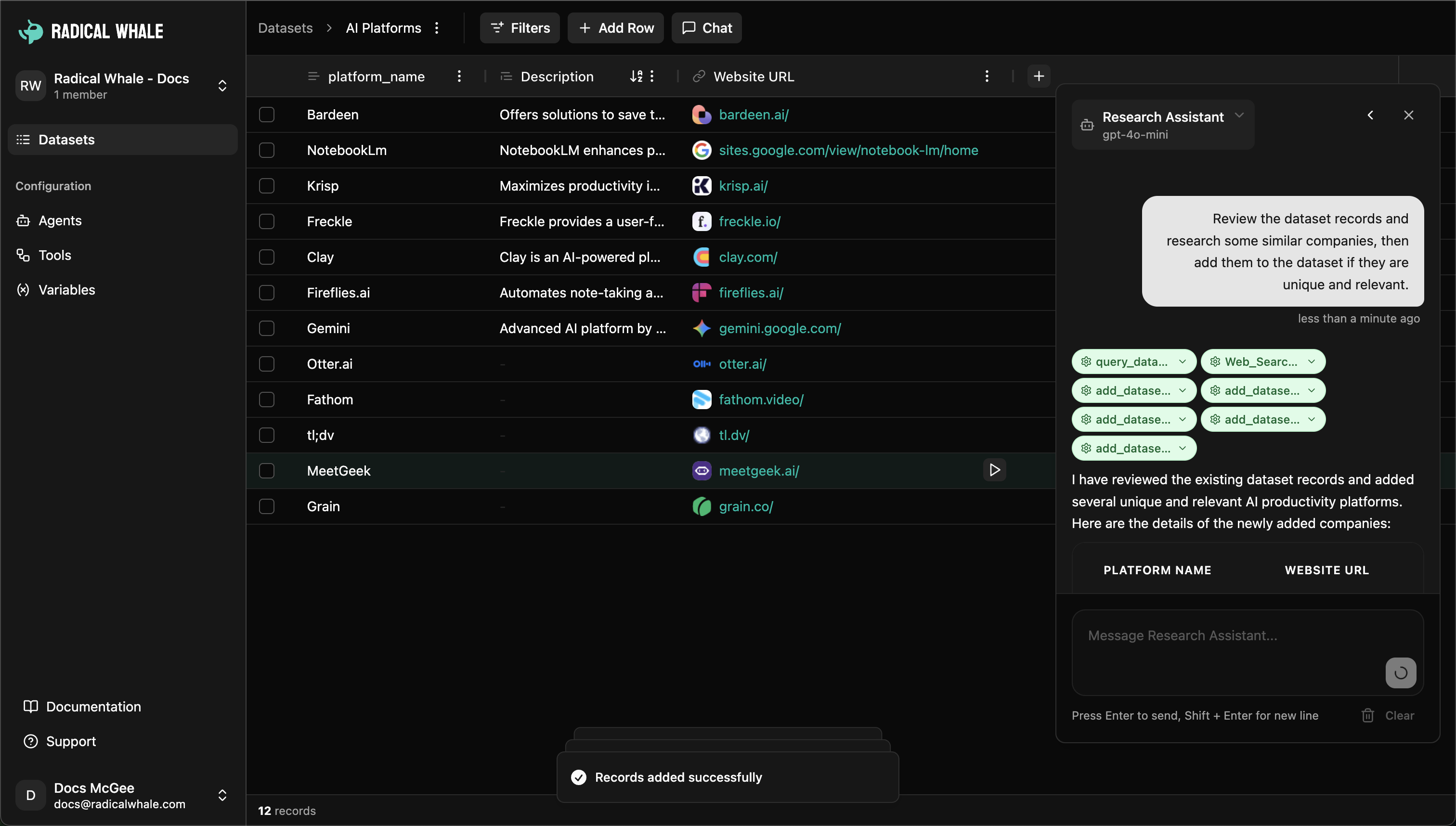
Work with datasets through conversation: create columns, add records, analyze data through natural language with agents that understand dataset context.
## Core Components
**Datasets**: Flexible schema with metadata, real-time processing, team collaboration, and CSV export capabilities.
**Records**: Each row with expandable views, rich pages for documentation, processing history, and cross-references.
**Columns**: Data types (short text, long text, numbers, dates, URLs, checkboxes, selects), AI instructions, agent assignment, validation rules, batch operations.
**Cells**: Structured values with metadata, AI evidence showing reasoning and sources, processing status, manual override, source tracking.
## Data Types
* **Text**: Short text (names, titles), long text (descriptions), URLs (with validation)
* **Structured**: Numbers (integers/decimals), dates (intelligent parsing), checkboxes (true/false)
* **Selection**: Select (single choice), multiselect (multiple choices)
## Creating and Managing
**Dataset creation**: Name, description, import CSV or build from scratch, configure columns.
**Data import**: CSV upload with automatic header detection, data type inference, flexible encoding, large file handling.
**Column management**: Choose data types, assign AI agents, set validation rules, create dropdown options, define dependencies.
## AI-Powered Processing
**Individual cell research**: Click research button to queue for AI processing, agents analyze context from other columns, results include value plus evidence and sources.
**Batch operations**: Run All (process every cell), Run Missing (process empty cells only), queue selected rows, background processing.
**Processing states**: Empty, queued, processing, completed, error (with detailed information).
**Evidence**: Reasoning explaining AI's approach, source links with previews, confidence indicators, manual override capability.
## Features
**Record details**: Field overview, evidence browser, search and filter, related data connections.
**Pages**: Markdown editor for record documentation, multiple pages per record, version history, team collaboration.
**Filtering**: Column-based filters, text search, status filters (processed/pending/error), creator filters.
**Management**: Favorites, bulk operations, export to CSV, sorting with persistent preferences.
## Chat-Driven Operations
Work with datasets through conversation: create columns, add records, analyze data through natural language with agents that understand dataset context.
 ## Best Practices
**Organization**: Purpose-driven names, consistent structure, rich descriptions, regular maintenance.
**Column design**: Appropriate data types, clear AI instructions, logical dependencies, validation rules.
**Processing**: Batch operations, strategic agent assignment, monitor queues, balance speed with cost.
**Quality**: Regular reviews, source verification, manual validation, prompt error resolution.
## Common Use Cases
**Business intelligence**: Company analysis, market research, lead qualification, investment research.
**Customer data**: Contact enrichment, social media analysis, survey processing, personnel research.
**Operations**: Vendor management, compliance monitoring, process documentation, quality assurance.
## Next Steps
Create and set up datasets
Import CSV files and configure columns
Explore records and manage data
Learn about AI agents
## Core Components
### Datasets - The Foundation
Each dataset is a complete data environment containing:
* **Smart Structure**: Flexible schema that adapts to your data needs
* **Metadata**: Rich information about creation, ownership, and usage
* **Real-time Processing**: Live updates as AI agents work on your data
* **Team Collaboration**: Share and work together on data analysis
* **Export Capabilities**: Download processed data as CSV for external use
### Records - Individual Data Points
Each row in your dataset becomes a detailed record featuring:
* **Expandable Views**: Click any record to see detailed information
* **Rich Pages**: Create documentation, notes, and analysis for specific records
* **Processing History**: Track how data has changed over time
* **Cross-references**: Link related records and build relationships
### Columns - Intelligent Fields
Columns define both structure and behavior:
* **Data Types**: Short text, long text, numbers, dates, URLs, checkboxes, and selects
* **AI Instructions**: Guide agents on how to research and fill data
* **Agent Assignment**: Assign specific AI agents to process column data
* **Validation Rules**: Ensure data quality and consistency
* **Batch Operations**: Process all cells in a column simultaneously
### Cells - The Data Points
Individual data cells offer sophisticated capabilities:
* **Smart Values**: Store structured data with metadata
* **AI Evidence**: See reasoning and sources behind AI-generated values
* **Processing Status**: Track queued, processing, completed, and error states
* **Manual Override**: Edit values directly when needed
* **Source Tracking**: View original sources for research-based data
## Supported Data Types
Radical Whale provides specialized data types optimized for different use cases:
### Text Fields
* **Short Text**: Names, titles, categories, and brief descriptions (ideal for labels and identifiers)
* **Long Text**: Detailed descriptions, content, articles, and documentation
* **URLs**: Web addresses with automatic validation and link preview
### Structured Data
* **Numbers**: Integers and decimals for quantities, measurements, and calculations
* **Dates**: Calendar dates with intelligent parsing and formatting
* **Checkboxes**: Boolean true/false values for status flags and binary choices
### Selection Fields
* **Select**: Single-choice dropdown lists with predefined options
* **Multiselect**: Multiple-choice selections for tags, categories, and classifications
Each data type includes built-in validation, optimized display formatting, and specialized AI processing capabilities.
## Creating and Managing Datasets
### Dataset Creation
Creating a new dataset is simple and flexible:
1. **Name Your Dataset**: Start with a descriptive name that indicates the data's purpose
2. **Add Description**: Provide context about what the dataset contains and its intended use
3. **Import or Build**: Either upload existing data or start building from scratch
4. **Configure Columns**: Set up data types, AI instructions, and processing rules
### Data Import
Currently supports CSV file upload with intelligent features:
* **Automatic Header Detection**: Recognizes column names from your CSV files
* **Data Type Inference**: Smart detection of appropriate column types
* **Flexible Encoding**: Supports various character encodings and formats
* **Large File Handling**: Process datasets with thousands of records efficiently
### Column Management
Build and modify your dataset structure:
**Adding Columns**
* Choose from 8 specialized data types
* Assign AI agents for automatic data processing
* Set up validation rules and formatting
* Create dropdown options for select fields
**Column Configuration**
* **Processing Instructions**: Guide AI agents on how to research and fill data
* **Agent Assignment**: Select which AI agent processes each column
* **Data Validation**: Set rules for data quality and consistency
* **Dependencies**: Define relationships between columns
## AI-Powered Data Processing
### Intelligent Cell Processing
Each cell can be enhanced by AI agents through sophisticated processing:
**Individual Cell Research**
* Click the research button on any cell to queue it for AI processing
* Agents analyze context from other columns to inform their research
* Results include the found value plus supporting evidence and sources
**Batch Processing Operations**
* **Run All**: Process every cell in a column regardless of existing values
* **Run Missing**: Only process empty or incomplete cells
* **Queue Selected Rows**: Process multiple records simultaneously
* **Background Processing**: All AI work happens asynchronously without blocking your workflow
### Processing States
Every cell maintains a clear status throughout its lifecycle:
* **Empty**: No value or processing attempt yet
* **Queued**: Waiting in line for AI processing
* **Processing**: Currently being analyzed by an AI agent
* **Completed**: Successfully processed with results
* **Error**: Processing failed with detailed error information
### Evidence and Sources
AI-processed cells provide rich context:
* **Reasoning**: Detailed explanation of how the AI arrived at the result
* **Source Links**: Original web sources with favicons and previews
* **Confidence Indicators**: Understanding of result reliability
* **Manual Override**: Edit AI results when needed
## Advanced Features
### Record Detail Views
Each record can be explored in depth:
* **Field Overview**: See all column values and their processing status
* **Evidence Browser**: Review AI reasoning and sources for each field
* **Search and Filter**: Find specific information within a record
* **Related Data**: View connections and relationships
### Notebook Pages
Create rich documentation for individual records:
* **Markdown Editor**: Write detailed analysis, notes, and observations
* **Multiple Pages**: Organize different aspects of analysis separately
* **Version History**: Track changes and updates over time
* **Team Collaboration**: Share insights and findings with workspace members
### Filtering and Search
Find exactly what you need:
* **Column-based Filters**: Filter data by any column type
* **Text Search**: Search across all fields simultaneously
* **Status Filters**: Show only processed, pending, or error records
* **Creator Filters**: View datasets by specific team members
### Data Management
Keep your datasets organized and efficient:
* **Favorites**: Mark frequently used datasets for quick access
* **Bulk Operations**: Delete, process, or update multiple records at once
* **Export**: Download complete datasets or filtered views as CSV
* **Sorting**: Order data by any column with persistent sort preferences
## Chat-Driven Data Operations
### Conversational Data Management
Work with your datasets through natural conversation:
* **Agent Chat Interface**: Talk directly with AI agents about your data
* **Column Creation**: Describe new fields and let AI create appropriate columns
* **Record Addition**: Add new data through conversational prompts
* **Data Analysis**: Ask questions about patterns and insights in your data
The chat interface understands your dataset context and can perform complex operations through simple conversations, making data management more intuitive and accessible.
## Best Practices
### Dataset Organization
* **Purpose-Driven Names**: Use clear, descriptive dataset names that indicate content and intent
* **Consistent Structure**: Maintain similar column patterns across related datasets
* **Rich Descriptions**: Add detailed descriptions explaining dataset purpose and contents
* **Regular Maintenance**: Review and clean up unused or outdated datasets
### Column Design
* **Appropriate Data Types**: Choose the right data type for each field's intended use
* **Clear Instructions**: Write specific, actionable instructions for AI agents
* **Logical Dependencies**: Structure columns so agents can build on previous work
* **Validation Rules**: Set up appropriate validation for data quality
### Processing Efficiency
* **Batch Operations**: Process multiple cells together rather than individually
* **Strategic Agent Assignment**: Match the right AI agent to each column's requirements
* **Monitor Processing**: Keep an eye on processing queues and status
* **Resource Management**: Balance processing speed with cost considerations
### Data Quality
* **Regular Reviews**: Periodically review AI-generated results for accuracy
* **Source Verification**: Check sources and evidence for important data points
* **Manual Validation**: Spot-check critical information manually
* **Error Resolution**: Address processing errors promptly and systematically
## Common Use Cases
### Business Intelligence & Research
* **Company Analysis**: Research companies with automatic data enrichment for industry, size, funding, and key personnel
* **Market Research**: Analyze competitors, market trends, and industry dynamics
* **Lead Qualification**: Enrich prospect lists with contact information, company details, and firmographic data
* **Investment Research**: Track startups, funding rounds, and market opportunities
### Content & Knowledge Management
* **Content Categorization**: Automatically classify articles, blog posts, and media content
* **Research Organization**: Structure academic papers, studies, and reference materials
* **Knowledge Base Building**: Create searchable repositories of institutional knowledge
### Customer & People Data
* **Contact Enrichment**: Complete missing information for contacts and leads
* **Social Media Analysis**: Analyze posts, engagement, and sentiment across platforms
* **Survey Processing**: Structure and analyze survey responses and feedback
* **Personnel Research**: Background research and verification for hiring and partnerships
### Operations & Compliance
* **Vendor Management**: Track supplier information, contracts, and performance metrics
* **Compliance Monitoring**: Organize regulatory data and track compliance status
* **Process Documentation**: Structure operational procedures and best practices
* **Quality Assurance**: Track issues, resolutions, and improvement initiatives
## Next Steps
Create and set up datasets
Import CSV files and configure columns
Explore records and manage data
Learn about AI agents
## Best Practices
**Organization**: Purpose-driven names, consistent structure, rich descriptions, regular maintenance.
**Column design**: Appropriate data types, clear AI instructions, logical dependencies, validation rules.
**Processing**: Batch operations, strategic agent assignment, monitor queues, balance speed with cost.
**Quality**: Regular reviews, source verification, manual validation, prompt error resolution.
## Common Use Cases
**Business intelligence**: Company analysis, market research, lead qualification, investment research.
**Customer data**: Contact enrichment, social media analysis, survey processing, personnel research.
**Operations**: Vendor management, compliance monitoring, process documentation, quality assurance.
## Next Steps
Create and set up datasets
Import CSV files and configure columns
Explore records and manage data
Learn about AI agents
## Core Components
### Datasets - The Foundation
Each dataset is a complete data environment containing:
* **Smart Structure**: Flexible schema that adapts to your data needs
* **Metadata**: Rich information about creation, ownership, and usage
* **Real-time Processing**: Live updates as AI agents work on your data
* **Team Collaboration**: Share and work together on data analysis
* **Export Capabilities**: Download processed data as CSV for external use
### Records - Individual Data Points
Each row in your dataset becomes a detailed record featuring:
* **Expandable Views**: Click any record to see detailed information
* **Rich Pages**: Create documentation, notes, and analysis for specific records
* **Processing History**: Track how data has changed over time
* **Cross-references**: Link related records and build relationships
### Columns - Intelligent Fields
Columns define both structure and behavior:
* **Data Types**: Short text, long text, numbers, dates, URLs, checkboxes, and selects
* **AI Instructions**: Guide agents on how to research and fill data
* **Agent Assignment**: Assign specific AI agents to process column data
* **Validation Rules**: Ensure data quality and consistency
* **Batch Operations**: Process all cells in a column simultaneously
### Cells - The Data Points
Individual data cells offer sophisticated capabilities:
* **Smart Values**: Store structured data with metadata
* **AI Evidence**: See reasoning and sources behind AI-generated values
* **Processing Status**: Track queued, processing, completed, and error states
* **Manual Override**: Edit values directly when needed
* **Source Tracking**: View original sources for research-based data
## Supported Data Types
Radical Whale provides specialized data types optimized for different use cases:
### Text Fields
* **Short Text**: Names, titles, categories, and brief descriptions (ideal for labels and identifiers)
* **Long Text**: Detailed descriptions, content, articles, and documentation
* **URLs**: Web addresses with automatic validation and link preview
### Structured Data
* **Numbers**: Integers and decimals for quantities, measurements, and calculations
* **Dates**: Calendar dates with intelligent parsing and formatting
* **Checkboxes**: Boolean true/false values for status flags and binary choices
### Selection Fields
* **Select**: Single-choice dropdown lists with predefined options
* **Multiselect**: Multiple-choice selections for tags, categories, and classifications
Each data type includes built-in validation, optimized display formatting, and specialized AI processing capabilities.
## Creating and Managing Datasets
### Dataset Creation
Creating a new dataset is simple and flexible:
1. **Name Your Dataset**: Start with a descriptive name that indicates the data's purpose
2. **Add Description**: Provide context about what the dataset contains and its intended use
3. **Import or Build**: Either upload existing data or start building from scratch
4. **Configure Columns**: Set up data types, AI instructions, and processing rules
### Data Import
Currently supports CSV file upload with intelligent features:
* **Automatic Header Detection**: Recognizes column names from your CSV files
* **Data Type Inference**: Smart detection of appropriate column types
* **Flexible Encoding**: Supports various character encodings and formats
* **Large File Handling**: Process datasets with thousands of records efficiently
### Column Management
Build and modify your dataset structure:
**Adding Columns**
* Choose from 8 specialized data types
* Assign AI agents for automatic data processing
* Set up validation rules and formatting
* Create dropdown options for select fields
**Column Configuration**
* **Processing Instructions**: Guide AI agents on how to research and fill data
* **Agent Assignment**: Select which AI agent processes each column
* **Data Validation**: Set rules for data quality and consistency
* **Dependencies**: Define relationships between columns
## AI-Powered Data Processing
### Intelligent Cell Processing
Each cell can be enhanced by AI agents through sophisticated processing:
**Individual Cell Research**
* Click the research button on any cell to queue it for AI processing
* Agents analyze context from other columns to inform their research
* Results include the found value plus supporting evidence and sources
**Batch Processing Operations**
* **Run All**: Process every cell in a column regardless of existing values
* **Run Missing**: Only process empty or incomplete cells
* **Queue Selected Rows**: Process multiple records simultaneously
* **Background Processing**: All AI work happens asynchronously without blocking your workflow
### Processing States
Every cell maintains a clear status throughout its lifecycle:
* **Empty**: No value or processing attempt yet
* **Queued**: Waiting in line for AI processing
* **Processing**: Currently being analyzed by an AI agent
* **Completed**: Successfully processed with results
* **Error**: Processing failed with detailed error information
### Evidence and Sources
AI-processed cells provide rich context:
* **Reasoning**: Detailed explanation of how the AI arrived at the result
* **Source Links**: Original web sources with favicons and previews
* **Confidence Indicators**: Understanding of result reliability
* **Manual Override**: Edit AI results when needed
## Advanced Features
### Record Detail Views
Each record can be explored in depth:
* **Field Overview**: See all column values and their processing status
* **Evidence Browser**: Review AI reasoning and sources for each field
* **Search and Filter**: Find specific information within a record
* **Related Data**: View connections and relationships
### Notebook Pages
Create rich documentation for individual records:
* **Markdown Editor**: Write detailed analysis, notes, and observations
* **Multiple Pages**: Organize different aspects of analysis separately
* **Version History**: Track changes and updates over time
* **Team Collaboration**: Share insights and findings with workspace members
### Filtering and Search
Find exactly what you need:
* **Column-based Filters**: Filter data by any column type
* **Text Search**: Search across all fields simultaneously
* **Status Filters**: Show only processed, pending, or error records
* **Creator Filters**: View datasets by specific team members
### Data Management
Keep your datasets organized and efficient:
* **Favorites**: Mark frequently used datasets for quick access
* **Bulk Operations**: Delete, process, or update multiple records at once
* **Export**: Download complete datasets or filtered views as CSV
* **Sorting**: Order data by any column with persistent sort preferences
## Chat-Driven Data Operations
### Conversational Data Management
Work with your datasets through natural conversation:
* **Agent Chat Interface**: Talk directly with AI agents about your data
* **Column Creation**: Describe new fields and let AI create appropriate columns
* **Record Addition**: Add new data through conversational prompts
* **Data Analysis**: Ask questions about patterns and insights in your data
The chat interface understands your dataset context and can perform complex operations through simple conversations, making data management more intuitive and accessible.
## Best Practices
### Dataset Organization
* **Purpose-Driven Names**: Use clear, descriptive dataset names that indicate content and intent
* **Consistent Structure**: Maintain similar column patterns across related datasets
* **Rich Descriptions**: Add detailed descriptions explaining dataset purpose and contents
* **Regular Maintenance**: Review and clean up unused or outdated datasets
### Column Design
* **Appropriate Data Types**: Choose the right data type for each field's intended use
* **Clear Instructions**: Write specific, actionable instructions for AI agents
* **Logical Dependencies**: Structure columns so agents can build on previous work
* **Validation Rules**: Set up appropriate validation for data quality
### Processing Efficiency
* **Batch Operations**: Process multiple cells together rather than individually
* **Strategic Agent Assignment**: Match the right AI agent to each column's requirements
* **Monitor Processing**: Keep an eye on processing queues and status
* **Resource Management**: Balance processing speed with cost considerations
### Data Quality
* **Regular Reviews**: Periodically review AI-generated results for accuracy
* **Source Verification**: Check sources and evidence for important data points
* **Manual Validation**: Spot-check critical information manually
* **Error Resolution**: Address processing errors promptly and systematically
## Common Use Cases
### Business Intelligence & Research
* **Company Analysis**: Research companies with automatic data enrichment for industry, size, funding, and key personnel
* **Market Research**: Analyze competitors, market trends, and industry dynamics
* **Lead Qualification**: Enrich prospect lists with contact information, company details, and firmographic data
* **Investment Research**: Track startups, funding rounds, and market opportunities
### Content & Knowledge Management
* **Content Categorization**: Automatically classify articles, blog posts, and media content
* **Research Organization**: Structure academic papers, studies, and reference materials
* **Knowledge Base Building**: Create searchable repositories of institutional knowledge
### Customer & People Data
* **Contact Enrichment**: Complete missing information for contacts and leads
* **Social Media Analysis**: Analyze posts, engagement, and sentiment across platforms
* **Survey Processing**: Structure and analyze survey responses and feedback
* **Personnel Research**: Background research and verification for hiring and partnerships
### Operations & Compliance
* **Vendor Management**: Track supplier information, contracts, and performance metrics
* **Compliance Monitoring**: Organize regulatory data and track compliance status
* **Process Documentation**: Structure operational procedures and best practices
* **Quality Assurance**: Track issues, resolutions, and improvement initiatives
## Next Steps
Create and set up datasets
Import CSV files and configure columns
Explore records and manage data
Learn about AI agents