> ## Documentation Index
> Fetch the complete documentation index at: https://docs.radicalwhale.com/llms.txt
> Use this file to discover all available pages before exploring further.
# Workspaces
> Team collaboration environments for data work
## What are Workspaces?
Workspaces are isolated environments containing all your team's resources: datasets, agents, tools, variables, and processing machines. Each workspace is a complete data collaboration environment with security and organization.
 ## Components
**Datasets & Records**: Smart tables from CSV/Excel, record management with expandable views, AI-powered cell processing, page editor for documentation.
**AI Agents**: Conversational AI with workspace context, custom configurations, data-aware responses, multi-model support (OpenAI, Anthropic).
**Tools & Automations**: API tools for external integrations, workflow builder, custom functions for team needs.
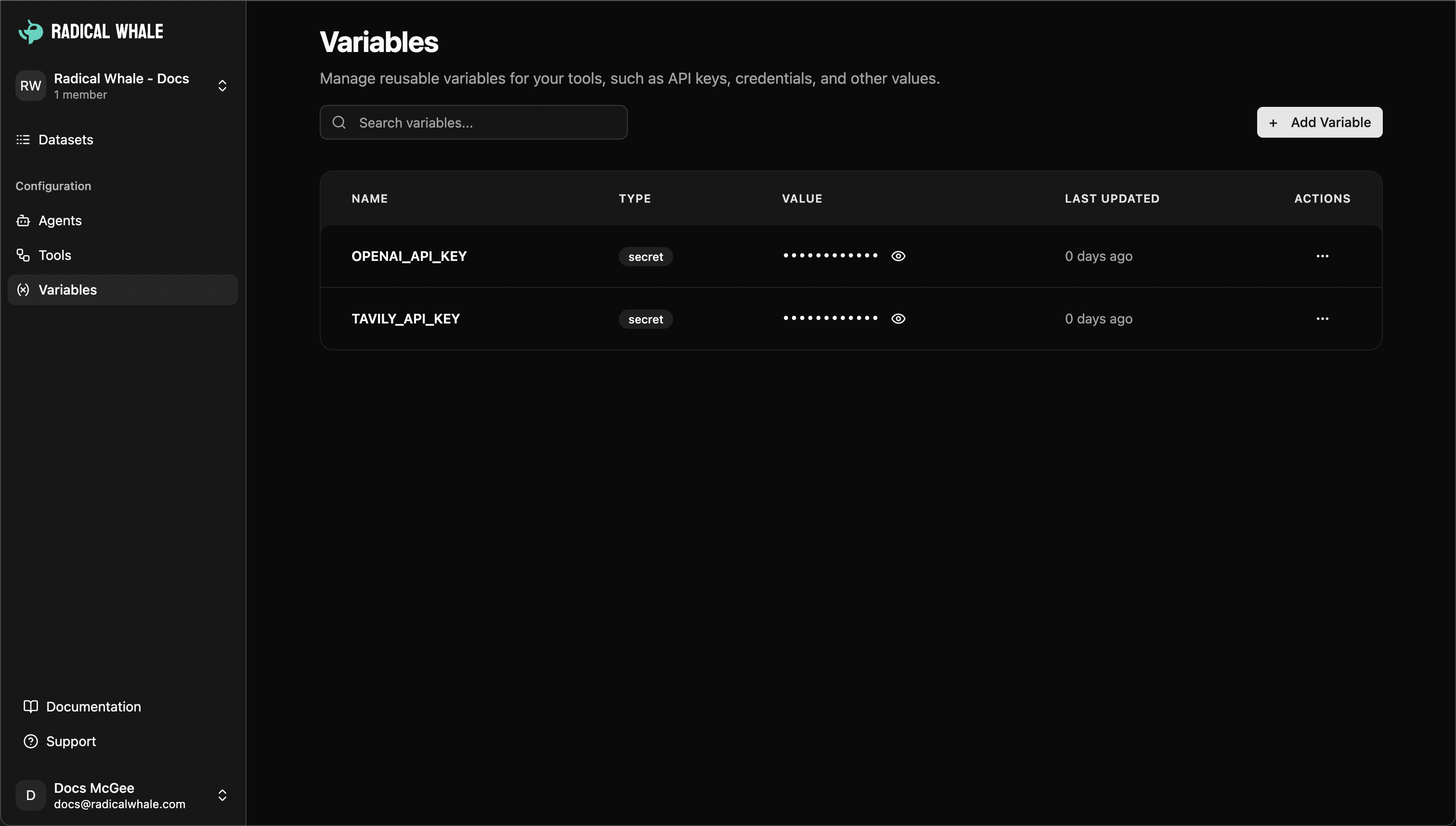
**Variables**: Encrypted storage for API keys and credentials, team sharing based on permissions, environment management for dev/prod.
## Components
**Datasets & Records**: Smart tables from CSV/Excel, record management with expandable views, AI-powered cell processing, page editor for documentation.
**AI Agents**: Conversational AI with workspace context, custom configurations, data-aware responses, multi-model support (OpenAI, Anthropic).
**Tools & Automations**: API tools for external integrations, workflow builder, custom functions for team needs.
**Variables**: Encrypted storage for API keys and credentials, team sharing based on permissions, environment management for dev/prod.
 **Processing Infrastructure**: Dedicated machines for heavy data work (paid plans), queue management, resource scaling.
## Team Collaboration
**Roles**:
* **Owner**: Complete control, member management, billing, workspace settings, full access
* **Admin**: Resource management (datasets, agents, tools), member management (except owners), variable management, limited settings
* **Member**: Access existing resources, create new resources with standard permissions, view variables (read-only)
**Workspace switching**: Easily switch between workspaces using sidebar switcher with complete resource isolation, independent billing, separate teams, dedicated processing queues.
**Invitations**: Email invitations with role assignment, automatic expiration, pending invite tracking.
## Management
**Creating workspaces**: Basic setup (name, description), plan selection (Free, Starter, Pro), team invitations, final configuration.
**Settings**: General information, member management, billing and subscription, usage tracking.
**Monitoring**: Queue metrics with live monitoring, machine management for paid plans (CPU/memory utilization, resource scaling, regional deployment).
## Plans & Pricing
**Free**: 3 members, 1,000 records/month, 5 datasets, standard support, shared resources.
**Starter**: 10 members, 10,000 records/month, 25 datasets, email support, dedicated machines available, advanced agents.
**Pro**: Unlimited members, 100,000 records/month, unlimited datasets, priority support, dedicated machines included, advanced monitoring, premium integrations.
## Best Practices
**Organization**: Project-based structure, clear naming, resource cleanup, documentation.
**Security**: Least privilege access, regular access reviews, variable security for credentials, data classification.
**Performance**: Machine scaling during high usage (paid plans), queue monitoring, data lifecycle policies, API rate limiting management.
## Common Use Cases
**Product teams**: Feature development workspaces, environment separation (dev/staging/prod), user research, A/B testing.
**Data teams**: Client projects with dedicated workspaces, research initiatives, data pipeline development, report automation.
**Business ops**: Department isolation (HR, finance, marketing), vendor management, compliance tracking, process documentation.
**Consulting**: Client separation with data isolation, project lifecycle management, team collaboration, deliverable preparation.
## Next Steps
Set up a new workspace
Learn about organizing data
Learn about AI agents
Learn about tool integrations
## Workspace Components
### Datasets & Records
* **Smart Tables**: Upload CSV, Excel, or structured data to create intelligent datasets
* **Record Management**: Each row becomes a detailed record with expandable views and nested data
* **Cell Processing**: AI-powered analysis and enrichment of individual table cells
* **Page Editor**: Create rich documentation and notes for individual records using our advanced text editor
### AI Agents
* **Conversational AI**: Chat with specialized agents that understand your workspace data
* **Custom Configurations**: Set up agents with specific personalities, tools, and knowledge
* **Data-Aware Responses**: Agents can access and reference your workspace datasets
* **Multi-Model Support**: Choose from different AI providers and models
### Tools & Automations
* **API Tools**: Create reusable HTTP requests for data enrichment and external integrations
* **Workflow Builder**: Design complex data processing pipelines
* **Custom Functions**: Build specialized tools for your team's unique needs
### Variables & Configuration
* **Secure Storage**: Encrypted storage for API keys, database credentials, and configuration
* **Team Sharing**: Variables are accessible to all workspace members based on permissions
* **Environment Management**: Organize different configurations for development and production
### Processing Infrastructure
* **Dedicated Machines**: Spin up processing machines for heavy data work (paid plans)
* **Queue Management**: Monitor and manage background processing jobs
* **Resource Scaling**: Add or remove computing resources based on workload
## Team Collaboration & Access Control
### Workspace Roles
**Owner**
* Complete workspace control and administration
* Member management: invite, remove, and change roles
* Billing and subscription management
* Workspace settings and deletion capabilities
* Full access to all resources and features
**Admin**
* Resource management: create, edit, and delete datasets, agents, and tools
* Member management: invite and remove members (except owners)
* Variable management: create and manage secure variables
* Limited workspace settings access
**Member**
* Access and use existing workspace resources
* Create new resources with standard permissions
* View and use variables (read-only access)
* Collaborate on datasets and workflows
### Workspace Switching
Easily switch between multiple workspaces using the workspace switcher in the sidebar. Each workspace maintains its own:
* Complete resource isolation
* Independent billing and settings
* Separate team members and permissions
* Dedicated processing queues and machines
### Invitation System
* **Email Invitations**: Send secure invitations to team members
* **Role Assignment**: Set specific roles when inviting new members
* **Expiration Management**: Invitations expire automatically for security
* **Pending Invite Tracking**: Monitor outstanding invitations in the members page
## Workspace Management
### Creating Workspaces
The workspace creation process guides you through:
1. **Basic Setup**: Name and description for your workspace
2. **Plan Selection**: Choose from Free, Starter, or Pro plans based on your needs
3. **Team Invitations**: Optionally invite team members during setup
4. **Final Configuration**: Complete setup and start collaborating
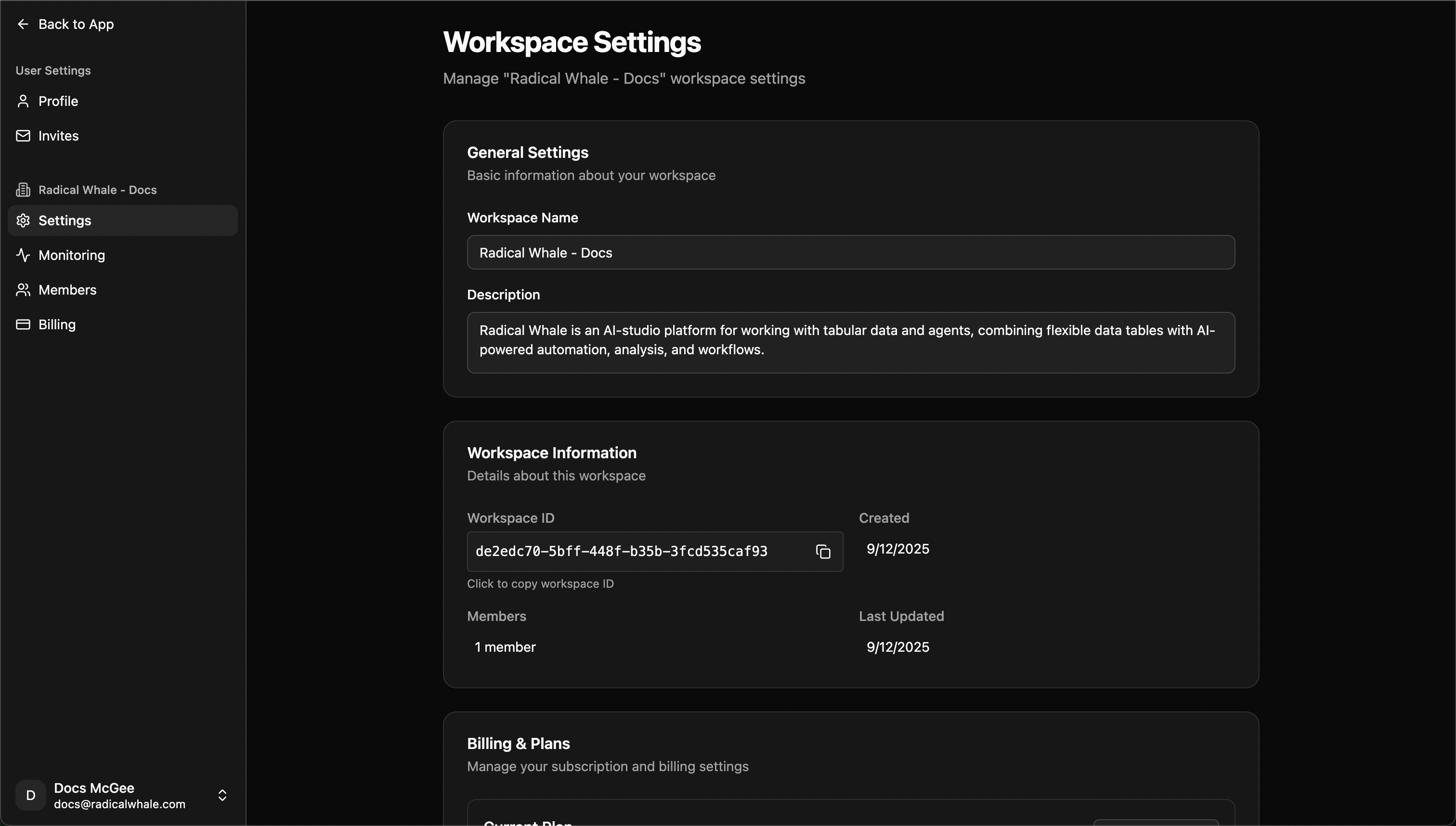
### Workspace Settings
Access comprehensive workspace management through the settings page:
**General Information**
* Workspace name and description editing
* Workspace ID for API integrations
* Creation and modification timestamps
* Member count and activity overview
**Member Management**
* View all workspace members and their roles
* Send new invitations with role assignment
* Monitor pending invitations and expiration
* Remove members or change permissions
**Billing & Subscription**
* Current plan overview and usage metrics
* Subscription management and plan upgrades
* Billing history and payment methods
* Usage tracking and limits monitoring
### Monitoring & Performance
Track workspace activity and performance:
**Queue Metrics**
* Live monitoring of background processing jobs
* Queue depth and processing speed insights
* Bottleneck identification and resolution
**Machine Management** (Paid Plans)
* Deploy dedicated processing machines
* Monitor CPU and memory utilization
* Scale resources up or down based on demand
* Regional deployment options
## Workspace Plans & Pricing
### Free Plan
* **3 workspace members** maximum
* **1,000 records** per month
* **5 datasets** limit
* Standard support
* Shared processing resources
### Starter Plan
* **10 workspace members** maximum
* **10,000 records** per month
* **25 datasets** limit
* Email support
* Dedicated processing machines available
* Advanced agent features
### Pro Plan
* **Unlimited workspace members**
* **100,000 records** per month
* **Unlimited datasets**
* Priority support
* Dedicated processing machines included
* Advanced monitoring and analytics
* Premium integrations
## Best Practices
### Workspace Organization
* **Project-Based Structure**: Create separate workspaces for distinct projects or clients
* **Clear Naming**: Use descriptive workspace names that indicate purpose and scope
* **Resource Cleanup**: Regularly archive or delete unused datasets and tools
* **Documentation**: Use record pages and descriptions to document important datasets
### Security & Permissions
* **Principle of Least Privilege**: Assign the minimum access level needed for each team member
* **Regular Access Reviews**: Periodically audit member permissions and active invitations
* **Variable Security**: Store all API keys and credentials in encrypted workspace variables
* **Data Classification**: Understand and document the sensitivity of data in each workspace
### Performance Optimization
* **Machine Scaling**: Add processing machines during high-usage periods (paid plans)
* **Queue Monitoring**: Watch processing queues and scale resources when bottlenecks occur
* **Data Lifecycle**: Implement retention policies for large datasets
* **API Rate Limiting**: Use workspace variables to manage API quotas and rate limits
## Common Use Cases
### Product & Engineering Teams
* **Feature Development**: Separate workspaces for different product features or experiments
* **Environment Management**: Dev, staging, and production workspace separation
* **User Research**: Organize customer feedback data and analysis workflows
* **A/B Testing**: Track experiment data and results with dedicated agents
### Data & Analytics Teams
* **Client Projects**: Individual workspaces for each client with dedicated datasets and workflows
* **Research Initiatives**: Organized spaces for specific research questions or hypotheses
* **Data Pipeline Development**: Build and test data transformation workflows
* **Report Automation**: Create reusable reporting templates and schedules
### Business Operations
* **Department Isolation**: Separate workspaces for HR, finance, marketing teams
* **Vendor Management**: Track supplier data and performance metrics
* **Compliance Tracking**: Organize regulatory data with appropriate access controls
* **Process Documentation**: Use record pages to document standard operating procedures
### Consulting & Professional Services
* **Client Separation**: Complete data isolation for different client engagements
* **Project Lifecycle**: Workspace-per-project model with defined start and end dates
* **Team Collaboration**: Shared access to project resources and findings
* **Deliverable Preparation**: Organize final reports and presentations
## Next Steps
Set up a new workspace
Learn about organizing data
Learn about AI agents
Learn about tool integrations
**Processing Infrastructure**: Dedicated machines for heavy data work (paid plans), queue management, resource scaling.
## Team Collaboration
**Roles**:
* **Owner**: Complete control, member management, billing, workspace settings, full access
* **Admin**: Resource management (datasets, agents, tools), member management (except owners), variable management, limited settings
* **Member**: Access existing resources, create new resources with standard permissions, view variables (read-only)
**Workspace switching**: Easily switch between workspaces using sidebar switcher with complete resource isolation, independent billing, separate teams, dedicated processing queues.
**Invitations**: Email invitations with role assignment, automatic expiration, pending invite tracking.
## Management
**Creating workspaces**: Basic setup (name, description), plan selection (Free, Starter, Pro), team invitations, final configuration.
**Settings**: General information, member management, billing and subscription, usage tracking.
**Monitoring**: Queue metrics with live monitoring, machine management for paid plans (CPU/memory utilization, resource scaling, regional deployment).
## Plans & Pricing
**Free**: 3 members, 1,000 records/month, 5 datasets, standard support, shared resources.
**Starter**: 10 members, 10,000 records/month, 25 datasets, email support, dedicated machines available, advanced agents.
**Pro**: Unlimited members, 100,000 records/month, unlimited datasets, priority support, dedicated machines included, advanced monitoring, premium integrations.
## Best Practices
**Organization**: Project-based structure, clear naming, resource cleanup, documentation.
**Security**: Least privilege access, regular access reviews, variable security for credentials, data classification.
**Performance**: Machine scaling during high usage (paid plans), queue monitoring, data lifecycle policies, API rate limiting management.
## Common Use Cases
**Product teams**: Feature development workspaces, environment separation (dev/staging/prod), user research, A/B testing.
**Data teams**: Client projects with dedicated workspaces, research initiatives, data pipeline development, report automation.
**Business ops**: Department isolation (HR, finance, marketing), vendor management, compliance tracking, process documentation.
**Consulting**: Client separation with data isolation, project lifecycle management, team collaboration, deliverable preparation.
## Next Steps
Set up a new workspace
Learn about organizing data
Learn about AI agents
Learn about tool integrations
## Workspace Components
### Datasets & Records
* **Smart Tables**: Upload CSV, Excel, or structured data to create intelligent datasets
* **Record Management**: Each row becomes a detailed record with expandable views and nested data
* **Cell Processing**: AI-powered analysis and enrichment of individual table cells
* **Page Editor**: Create rich documentation and notes for individual records using our advanced text editor
### AI Agents
* **Conversational AI**: Chat with specialized agents that understand your workspace data
* **Custom Configurations**: Set up agents with specific personalities, tools, and knowledge
* **Data-Aware Responses**: Agents can access and reference your workspace datasets
* **Multi-Model Support**: Choose from different AI providers and models
### Tools & Automations
* **API Tools**: Create reusable HTTP requests for data enrichment and external integrations
* **Workflow Builder**: Design complex data processing pipelines
* **Custom Functions**: Build specialized tools for your team's unique needs
### Variables & Configuration
* **Secure Storage**: Encrypted storage for API keys, database credentials, and configuration
* **Team Sharing**: Variables are accessible to all workspace members based on permissions
* **Environment Management**: Organize different configurations for development and production
### Processing Infrastructure
* **Dedicated Machines**: Spin up processing machines for heavy data work (paid plans)
* **Queue Management**: Monitor and manage background processing jobs
* **Resource Scaling**: Add or remove computing resources based on workload
## Team Collaboration & Access Control
### Workspace Roles
**Owner**
* Complete workspace control and administration
* Member management: invite, remove, and change roles
* Billing and subscription management
* Workspace settings and deletion capabilities
* Full access to all resources and features
**Admin**
* Resource management: create, edit, and delete datasets, agents, and tools
* Member management: invite and remove members (except owners)
* Variable management: create and manage secure variables
* Limited workspace settings access
**Member**
* Access and use existing workspace resources
* Create new resources with standard permissions
* View and use variables (read-only access)
* Collaborate on datasets and workflows
### Workspace Switching
Easily switch between multiple workspaces using the workspace switcher in the sidebar. Each workspace maintains its own:
* Complete resource isolation
* Independent billing and settings
* Separate team members and permissions
* Dedicated processing queues and machines
### Invitation System
* **Email Invitations**: Send secure invitations to team members
* **Role Assignment**: Set specific roles when inviting new members
* **Expiration Management**: Invitations expire automatically for security
* **Pending Invite Tracking**: Monitor outstanding invitations in the members page
## Workspace Management
### Creating Workspaces
The workspace creation process guides you through:
1. **Basic Setup**: Name and description for your workspace
2. **Plan Selection**: Choose from Free, Starter, or Pro plans based on your needs
3. **Team Invitations**: Optionally invite team members during setup
4. **Final Configuration**: Complete setup and start collaborating
### Workspace Settings
Access comprehensive workspace management through the settings page:
**General Information**
* Workspace name and description editing
* Workspace ID for API integrations
* Creation and modification timestamps
* Member count and activity overview
**Member Management**
* View all workspace members and their roles
* Send new invitations with role assignment
* Monitor pending invitations and expiration
* Remove members or change permissions
**Billing & Subscription**
* Current plan overview and usage metrics
* Subscription management and plan upgrades
* Billing history and payment methods
* Usage tracking and limits monitoring
### Monitoring & Performance
Track workspace activity and performance:
**Queue Metrics**
* Live monitoring of background processing jobs
* Queue depth and processing speed insights
* Bottleneck identification and resolution
**Machine Management** (Paid Plans)
* Deploy dedicated processing machines
* Monitor CPU and memory utilization
* Scale resources up or down based on demand
* Regional deployment options
## Workspace Plans & Pricing
### Free Plan
* **3 workspace members** maximum
* **1,000 records** per month
* **5 datasets** limit
* Standard support
* Shared processing resources
### Starter Plan
* **10 workspace members** maximum
* **10,000 records** per month
* **25 datasets** limit
* Email support
* Dedicated processing machines available
* Advanced agent features
### Pro Plan
* **Unlimited workspace members**
* **100,000 records** per month
* **Unlimited datasets**
* Priority support
* Dedicated processing machines included
* Advanced monitoring and analytics
* Premium integrations
## Best Practices
### Workspace Organization
* **Project-Based Structure**: Create separate workspaces for distinct projects or clients
* **Clear Naming**: Use descriptive workspace names that indicate purpose and scope
* **Resource Cleanup**: Regularly archive or delete unused datasets and tools
* **Documentation**: Use record pages and descriptions to document important datasets
### Security & Permissions
* **Principle of Least Privilege**: Assign the minimum access level needed for each team member
* **Regular Access Reviews**: Periodically audit member permissions and active invitations
* **Variable Security**: Store all API keys and credentials in encrypted workspace variables
* **Data Classification**: Understand and document the sensitivity of data in each workspace
### Performance Optimization
* **Machine Scaling**: Add processing machines during high-usage periods (paid plans)
* **Queue Monitoring**: Watch processing queues and scale resources when bottlenecks occur
* **Data Lifecycle**: Implement retention policies for large datasets
* **API Rate Limiting**: Use workspace variables to manage API quotas and rate limits
## Common Use Cases
### Product & Engineering Teams
* **Feature Development**: Separate workspaces for different product features or experiments
* **Environment Management**: Dev, staging, and production workspace separation
* **User Research**: Organize customer feedback data and analysis workflows
* **A/B Testing**: Track experiment data and results with dedicated agents
### Data & Analytics Teams
* **Client Projects**: Individual workspaces for each client with dedicated datasets and workflows
* **Research Initiatives**: Organized spaces for specific research questions or hypotheses
* **Data Pipeline Development**: Build and test data transformation workflows
* **Report Automation**: Create reusable reporting templates and schedules
### Business Operations
* **Department Isolation**: Separate workspaces for HR, finance, marketing teams
* **Vendor Management**: Track supplier data and performance metrics
* **Compliance Tracking**: Organize regulatory data with appropriate access controls
* **Process Documentation**: Use record pages to document standard operating procedures
### Consulting & Professional Services
* **Client Separation**: Complete data isolation for different client engagements
* **Project Lifecycle**: Workspace-per-project model with defined start and end dates
* **Team Collaboration**: Shared access to project resources and findings
* **Deliverable Preparation**: Organize final reports and presentations
## Next Steps
Set up a new workspace
Learn about organizing data
Learn about AI agents
Learn about tool integrations