

What are Agents?
Agents are AI assistants that combine language models (GPT-4o, Claude) with custom instructions, tools, and API access to automatically process data and engage in conversations about your work. Unlike simple chatbots, agents are workspace-aware, tool-enabled, and designed for both data processing and interactive collaboration.Core Components
AI Model: Choose from OpenAI (GPT-4o, GPT-4o Mini) or Anthropic (Claude Opus, Sonnet, Haiku). API keys stored securely in workspace variables. System Prompt: Defines agent personality, expertise, and behavior. Includes role definition, task instructions, output requirements, and behavioral guidelines. Tools: Web search, APIs, databases, and custom integrations that extend agent capabilities beyond the base AI model. Chat Interface: Real-time conversations with context awareness, tool usage visibility, and streaming responses.How Agents Work
Dataset Processing
Assign agents to dataset columns to automatically process data:- Column assignment: Each column can have its own processing instructions
- Individual processing: Click research button on any cell to queue it
- Batch operations: Process entire columns with “Run All” or “Run Missing”
- Background processing: All work happens asynchronously without blocking workflow
- Evidence tracking: AI provides detailed reasoning, sources, and confidence indicators
Interactive Chat
Agents serve as knowledgeable collaborators:- Understand datasets, tools, and ongoing projects
- Use connected tools during conversations
- Help with data analysis, planning, and decision-making
- Transparent tool usage with real-time execution
Creating Agents
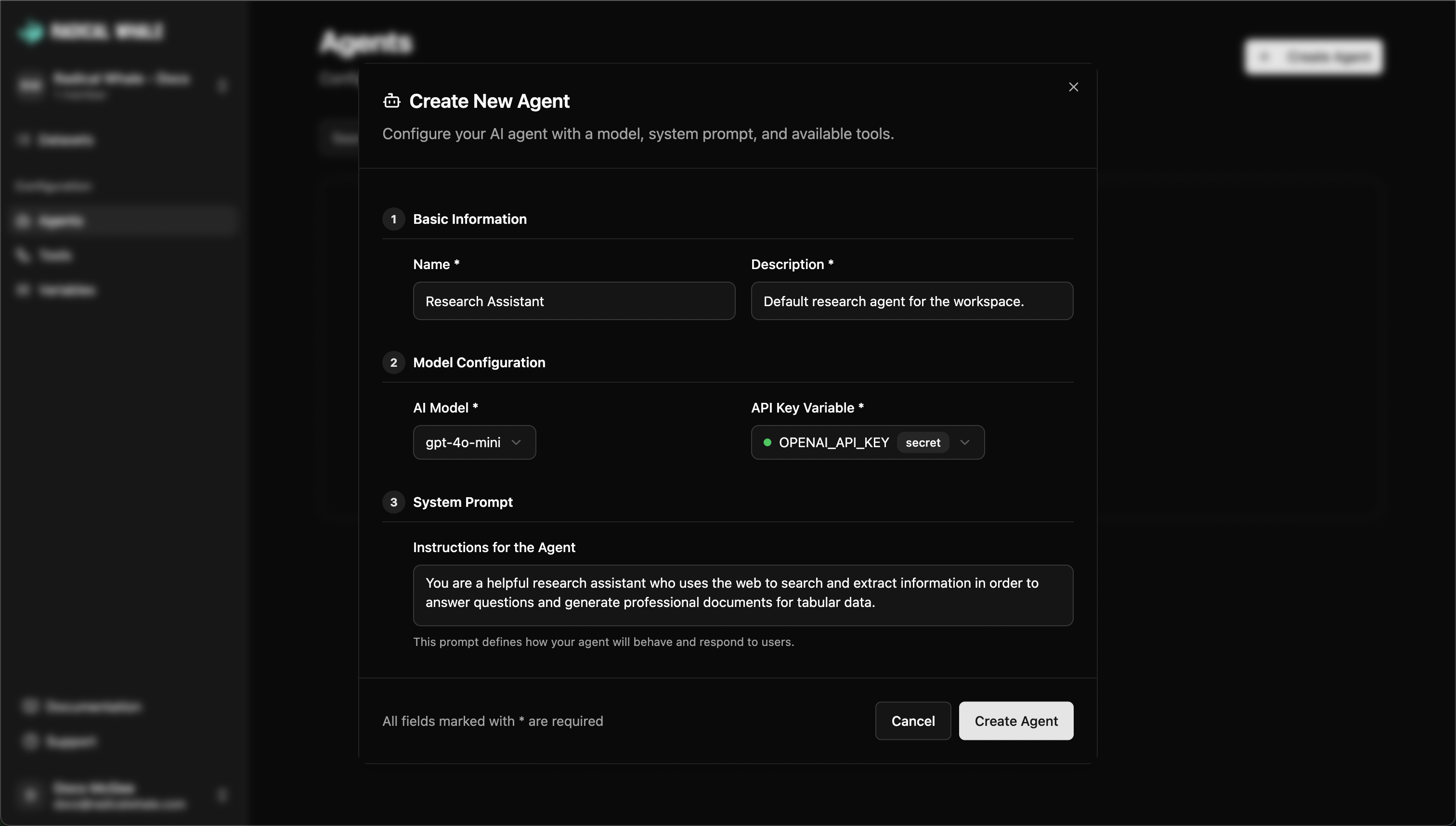
- Name and description
- Select AI model and configure API key
- Write system prompt defining role and behavior
- Select relevant tools from workspace library
- Test in chat interface before deploying
Management
Agent dashboard: View all agents with status, model, and activity. Search, filter, edit, duplicate, and test agents. Team collaboration: Agents available to all workspace members with shared context and institutional knowledge. Performance monitoring: Track processing states, tool usage, response times, success rates, and API consumption.Best Practices
Model selection: Use GPT-4o/Claude Opus for complex reasoning, GPT-4o Mini for straightforward tasks. Consider cost vs performance. Tool management: Start with essential tools, add gradually, monitor usage patterns and effectiveness. Security: Use workspace variables for API keys, monitor tool availability, regular testing of integrations.Common Use Cases
Business intelligence: Research companies, enrich contact lists, analyze competitive landscapes, track funding and acquisitions. Data processing: Fill missing information, standardize formats, cross-reference sources, validate accuracy. Customer management: Score leads, research prospects, gather contact information, analyze support tickets. Content creation: Research assistance, knowledge base development, summarization, best practices documentation.Next Steps
Creating Agents
Create and configure agents
Configuring Models
Set up and optimize AI models
Managing Tools
Configure tool integrations
Understanding Tools
Learn about agent tools
Core Components
How Agents Work
Dataset Processing
Agents can be assigned to specific dataset columns to automatically process data: Column Assignment- Assign agents to individual columns in your datasets
- Each column can have its own processing instructions
- Agents understand context from other columns to inform their work
- Process data individually or in batches across entire columns
- Individual Processing: Click the research button on any cell to queue it for processing
- Batch Operations: Process entire columns with “Run All” or “Run Missing” commands
- Background Processing: All work happens asynchronously without blocking your workflow
- Status Tracking: Monitor queued, processing, completed, and error states in real-time
- Agents provide detailed reasoning for their results
- Source links and references for research-based findings
- Confidence indicators and uncertainty acknowledgment
- Manual override capabilities when needed
Interactive Chat
Beyond data processing, agents serve as knowledgeable collaborators: Workspace Awareness- Understand your datasets, tools, and ongoing projects
- Access to workspace context for informed conversations
- Ability to help create new columns, records, and structures
- Integration with your existing data and workflows
- Use connected tools during chat conversations
- Research information, verify facts, and gather current data
- Transparent tool usage with expandable details
- Real-time tool execution with status updates
- Copy and share conversation results
- Build on previous interactions and context
- Help with data analysis, planning, and decision-making
- Support for both quick questions and deep exploration
Creating and Configuring Agents
Basic Information
Start with clear identification:- Name: Descriptive names like “Company Research Agent” or “Document Analyzer”
- Description: Detailed explanation of the agent’s purpose and capabilities
- Status: Active or inactive state for workspace management
Model Configuration
Select and configure the AI model: Model Selection Choose from available model providers:- OpenAI: GPT-4o, GPT-4o Mini, GPT-4.1 series, GPT-5 series
- Anthropic: Claude Opus 4.1, Claude Sonnet 4.0, Claude Haiku variants
- Future Models: System designed to support new model releases
- Use workspace variables for secure credential storage
- Never paste API keys directly into agent configuration
- Automatic validation of API key functionality
- Support for multiple API keys across different providers
System Prompt Engineering
Craft effective instructions for your agent: Role DefinitionTool Selection
Enhance agent capabilities with tools:- Select relevant tools from your workspace tool library
- Tools are filtered and searchable by name, type, and description
- Monitor tool usage and performance in chat conversations
Agent Management
Agent Dashboard
The agents interface provides comprehensive management:- Agent List: View all agents with status, model, and activity information
- Search and Filter: Find agents by name, model, or creation date
- Quick Actions: Edit, duplicate, test, and chat with agents
- Performance Metrics: Success rates, usage statistics, and processing history
Agent Operations
Creating Agents- Step-by-step creation wizard with validation
- Real-time preview of configuration
- Tool selection with capability previews
- API key validation and testing
- Interactive chat interface for testing
- Tool usage verification in controlled environment
- Prompt refinement through iterative testing
- Performance evaluation with sample data
- Update system prompts and tool selections
- Modify model configurations and API keys
- Manage agent status and availability
- Version control for configuration changes
Team Collaboration
Shared Agents- Agents are available to all workspace members
- Consistent processing across team workflows
- Shared context and institutional knowledge
- Collaborative prompt engineering and refinement
- Workspace-level agent management
- Tool permissions and usage controls
- API key security and access management
- Usage monitoring and cost tracking
Next Steps
Creating Agents
Create and configure agents
Configuring Models
Set up and optimize AI models
Managing Tools
Configure tool integrations
Understanding Tools
Learn about agent tools